Release Groups#
[This note-book is in oceantracker/tutorials_how_to/]
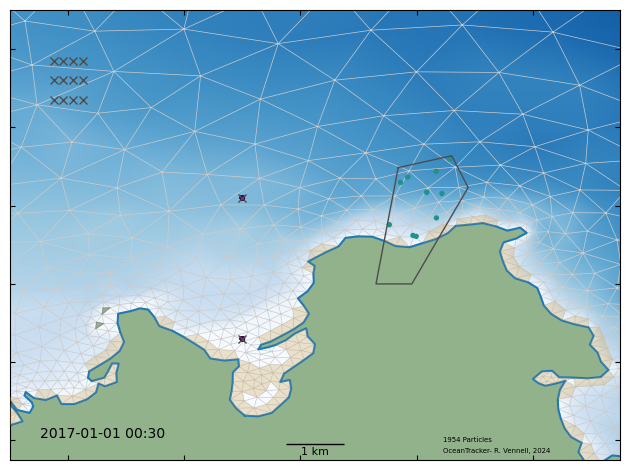
A release group is a set of particles released at the same times and location. There can be many release groups. This enables the fate of particles from different origins to be tracked separately within the same computational run. Importantly, on the fly statistics are separated into release groups. Eg. gridded statistics return a heat map for each release group, while polygon statistics give the connectivity between each given polygon and each release group.
A release group may be a:
“point_releases” set points, giving one or more 2D or 3D locations where particles are released. A radius for 2D release around theses point also can be set.
“polygon release”, where particles are released randomly within polygon made up of 3 or more 2D points. Particles will not be released in any parts of the polygon outside the domain.
“grid_release”, particles released from points on a regular grid.
For polygons, the vertical release location is randomly chosen in the water column, or user a given in z range. If the z value of a point release is not given, then the vertical release location is chosen in the same manner.
For both types user can specify:
time to start and end the release, or the duration of the release. Defaults are to start at beginning of hindcast and continue until it’s end.
the time between releases, the “release_interval”, a zero value gives a single release.
the number of particles release each time, the “pulse_size”
whether to release in dry cells, default “allow_release_in_dry_cells” = False
Plus other options see:
add links…
# Notes for debugging if the scripts below fail:
# * These scripts assume that you already installed oceantracker. If you didn't take a look at https://oceantracker.github.io/oceantracker/_build/html/info/installing.html
# * Paths in this directory are relative to the location of the ipython notebook.
#   I.e. On Linux or Mac, running a cell with "!ls" should return a list containing the notebook you are running.

# Checks if the hindcast data is available and downloads them if not
from oceantracker.util.download_data import download_hindcast_data_for_tutorials
download_hindcast_data_for_tutorials()
Hindcast data found locally at ./demo_hindcast
# show example of release types with start and end times,
# ------------------------------------------------
from oceantracker.main import OceanTracker
import os


ot = OceanTracker()

# ot.settings method use to set basic settings
ot.settings(
    run_output_dir=os.path.join("output", "release_groups"),
    time_step=120.0,  #  2 min time step as seconds
)
# ot.set_class, sets parameters for a named class
ot.add_class(
    "reader",
    # folder to search for hindcast files, sub-dirs will, by default, also be searched
    input_dir="./demo_hindcast/schsim3D",
    # hindcast file mask - only read files that follow this pattern
    file_mask="demo_hindcast_schisim3D*.nc",
)

# add  point release locations from two points,
ot.add_class(
    "release_groups",
    class_name="PointRelease",  # point is the default so this is technically not needed for point release
    points=[
        [1595000, 5482600, -1],  # [x,y,z(optional)] pairs of release locations
        [1595000, 5486200, -1],
    ],  # must be an N by 2 or 3 or list, convertible to a numpy array
    release_interval=1800,  # seconds between releasing particles
    pulse_size=10,  # number of particles released each release_interval
)
# add a polygon release
ot.add_class(
    "release_groups",
    class_name="PolygonRelease",  # class to use
    # (x,y) points making up a 2D polygon
    points=[
        [1597682.0, 5486972],
        [1598604, 5487275],
        [1598886, 5486464],
        [1597917.0, 5484000],
        [1597300, 5484000],
        [1597682, 5486972],
    ],
    # the below are optional settings/parameters
    release_interval=3600,
    pulse_size=10,
    z_min=-2.0,
    z_max=0.5,
)  # set a z range to release, in default is full water depth
ot.add_class(
    "release_groups",
    class_name="GridRelease",  # class to use
    start="2017-01-01T02:30:00",  # optional start and end times
    grid_center=[1592000, 5489200],  # location of grid centre
    grid_span=[500, 1000],  # size of grid in meters
    grid_size=[3, 4],  # rows and columns in grid
    release_interval=1800,
    pulse_size=2,
    z_min=-2,
    z_max=-0.5,
)  # release at random depth between these values
# run oceantracker
case_info_file_name = ot.run()
prelim:     Starting package set up
helper: ----------------------------------------------------------------------
helper: Starting OceanTracker helper class,  version 0.5.2.55
helper:      Python version: 3.11.14 | packaged by conda-forge | (main, Oct 22 2025, 22:46:25) [GCC 14.3.0]
helper: ----------------------------------------------------------------------
helper: OceanTracker version 0.5.2.55  starting setup helper "main.py":
helper: Started
helper: Output is in dir "/home/ls/projects/oceantracker_dev/oceantracker/tutorials_how_to/output/release_groups"
helper:     hint: see for copies of screen output and user supplied parameters, plus all other output
helper:     >>> Note: to help with debugging, parameters as given by user  are in "raw_user_params.json"
helper: ----------------------------------------------------------------------
helper: Numba setup: applied settings, max threads = 32, physical cores = 32
helper:     hint:  cache code = False, fastmath= False
helper: ----------------------------------------------------------------------
loading oceantracker read files
helper:       - Built OceanTracker package tree,      1.013 sec
helper:       - Built OceanTracker sort name map,     0.000 sec
helper:   - Done package set up to setup ClassImporter,       1.013 sec
setup: ----------------------------------------------------------------------
setup:  OceanTracker version 0.5.2.55
setup:     Starting user param. runner at 2026-01-21T17:40:48.953420
setup: ----------------------------------------------------------------------
setup:   - Start  field group manager and readers setup
setup:   - Found input dir "./demo_hindcast/schsim3D"
setup:   - Detected reader class_name = "oceantracker.reader.SCHISM_reader.SCHISMreader"
setup:   - Starting grid setup
setup:     - built node to triangles map,     0.909 sec
setup:     - built triangle adjacency matrix,         0.218 sec
setup:     - found boundary triangles,        0.001 sec
setup:     - built domain and island outlines,        1.161 sec
setup:     - calculated triangle areas,       0.000 sec
setup:   - Finished grid setup
setup: --- Hindcast info ----------------------------------------------------
setup:     Hydro-model is "3D", type "SCHISMreader"
setup:         hint: Files found in dir and sub-dirs of "./demo_hindcast/schsim3D"
setup:         Geographic coords = "False"
setup:         Hindcast start: 2017-01-01T00:30:00  end:  2017-01-01T23:30:00
setup:           time step = 0 days 1 hrs 0 min 0 sec, number of time steps= 24
setup:           grid bounding box = [1589789.000 5479437.000] to [1603398.000 5501640.000]
setup:           has:  A_Z profile=True,  bottom stress=False, regrid to sigma=True
setup:           vertical grid type = "LSC", using vertical grid  "Sigma"
setup: ----------------------------------------------------------------------
setup:   - Built barycentric-transform matrix,        0.369 sec
setup:   - Loading reader fields ['water_depth', 'tide', 'water_velocity']
setup:   - Finished field group manager and readers setup,    4.954 sec
setup: ----------------------------------------------------------------------
setup:   - Added 3 release group(s) and found run start and end times,        5.693 sec
setup:   - Starting initial setup of all classes
setup:     - Done initial setup of all classes,       0.004 sec
setup: ----------------------------------------------------------------------
setup:   - Starting "release_groups",  duration: 0 days 23 hrs 0 min 0 sec
setup:       From 2017-01-01T00:30:00 to  2017-01-01T23:30:00
setup:       Time step 120.0 sec
setup:         using: A_Z_profile = False, bottom_stress = False
setup: ----------------------------------------------------------------------
setup:   -  Reading 24 time steps,  for hindcast time steps 00:23 into ring buffer offsets 000:023 ,  for run "None"
setup:       -  read  24 time steps in  1.5 sec, from ./demo_hindcast/schsim3D
setup:   - Starting time stepping: 2017-01-01T00:30:00 to 2017-01-01T23:30:00
setup:     duration  0 days 23 hrs 0 min 0 sec, time step=  0 days 0 hrs 2 min 0 sec
S:   - Opened tracks output and done written first time step in: "tracks_compact_000.nc",     0.130 sec
S: 0000: 00%:H0000b00-01 Day +00 00:00 2017-01-01 00:30:00: Rel:30   : Active:30     Move:30     Bottom:0     Strand:0      Dead:0     Out:   0 Buffer: 1%  step time = 10598.0 ms
S: 0030: 04%:H0001b01-02 Day +00 01:00 2017-01-01 01:30:00: Rel:78   : Active:78     Move:78     Bottom:0     Strand:0      Dead:0     Out:   0 Buffer: 3%  step time =  7.2 ms
S: 0060: 09%:H0002b02-03 Day +00 02:00 2017-01-01 02:30:00: Rel:151  : Active:151    Move:150    Bottom:0     Strand:1      Dead:0     Out:   0 Buffer: 6%  step time = 341.2 ms
S: 0090: 13%:H0003b03-04 Day +00 03:00 2017-01-01 03:30:00: Rel:239  : Active:239    Move:213    Bottom:0     Strand:26     Dead:0     Out:   0 Buffer:10%  step time = 14.3 ms
S: 0120: 17%:H0004b04-05 Day +00 04:00 2017-01-01 04:30:00: Rel:314  : Active:314    Move:288    Bottom:0     Strand:26     Dead:0     Out:   0 Buffer:14%  step time = 11.3 ms
S: 0150: 22%:H0005b05-06 Day +00 05:00 2017-01-01 05:30:00: Rel:391  : Active:391    Move:365    Bottom:0     Strand:26     Dead:0     Out:   0 Buffer:17%  step time =  8.8 ms
S: 0180: 26%:H0006b06-07 Day +00 06:00 2017-01-01 06:30:00: Rel:468  : Active:468    Move:442    Bottom:0     Strand:26     Dead:0     Out:   0 Buffer:21%  step time = 14.6 ms
S: 0210: 30%:H0007b07-08 Day +00 07:00 2017-01-01 07:30:00: Rel:545  : Active:545    Move:519    Bottom:0     Strand:26     Dead:0     Out:   0 Buffer:24%  step time = 12.8 ms
S: 0240: 35%:H0008b08-09 Day +00 08:00 2017-01-01 08:30:00: Rel:623  : Active:623    Move:597    Bottom:0     Strand:26     Dead:0     Out:   0 Buffer:28%  step time = 10.1 ms
S: 0270: 39%:H0009b09-10 Day +00 09:00 2017-01-01 09:30:00: Rel:710  : Active:710    Move:709    Bottom:0     Strand:1      Dead:0     Out:   0 Buffer:32%  step time = 11.0 ms
S: 0300: 43%:H0010b10-11 Day +00 10:00 2017-01-01 10:30:00: Rel:808  : Active:808    Move:808    Bottom:0     Strand:0      Dead:0     Out:   0 Buffer:36%  step time = 14.5 ms
S: 0330: 48%:H0011b11-12 Day +00 11:00 2017-01-01 11:30:00: Rel:905  : Active:905    Move:905    Bottom:0     Strand:0      Dead:0     Out:   0 Buffer:40%  step time = 14.6 ms
S: 0360: 52%:H0012b12-13 Day +00 12:00 2017-01-01 12:30:00: Rel:1,003: Active:1,003  Move:1,003  Bottom:0     Strand:0      Dead:0     Out:   0 Buffer:45%  step time = 12.6 ms
S: 0390: 57%:H0013b13-14 Day +00 13:00 2017-01-01 13:30:00: Rel:1,101: Active:1,101  Move:1,076  Bottom:0     Strand:25     Dead:0     Out:   0 Buffer:49%  step time = 11.0 ms
S: 0420: 61%:H0014b14-15 Day +00 14:00 2017-01-01 14:30:00: Rel:1,198: Active:1,198  Move:1,155  Bottom:0     Strand:43     Dead:0     Out:   0 Buffer:54%  step time = 12.1 ms
S: 0450: 65%:H0015b15-16 Day +00 15:00 2017-01-01 15:30:00: Rel:1,285: Active:1,285  Move:1,157  Bottom:0     Strand:128    Dead:0     Out:   0 Buffer:58%  step time = 11.2 ms
S: 0480: 70%:H0016b16-17 Day +00 16:00 2017-01-01 16:30:00: Rel:1,363: Active:1,363  Move:1,224  Bottom:0     Strand:139    Dead:0     Out:   0 Buffer:61%  step time = 15.1 ms
S: 0510: 74%:H0017b17-18 Day +00 17:00 2017-01-01 17:30:00: Rel:1,441: Active:1,441  Move:1,290  Bottom:0     Strand:151    Dead:0     Out:   0 Buffer:65%  step time = 15.4 ms
S: 0540: 78%:H0018b18-19 Day +00 18:00 2017-01-01 18:30:00: Rel:1,519: Active:1,519  Move:1,368  Bottom:0     Strand:151    Dead:0     Out:   0 Buffer:68%  step time = 10.8 ms
S: 0570: 83%:H0019b19-20 Day +00 19:00 2017-01-01 19:30:00: Rel:1,595: Active:1,595  Move:1,447  Bottom:0     Strand:148    Dead:0     Out:   0 Buffer:72%  step time = 10.8 ms
S: 0600: 87%:H0020b20-21 Day +00 20:00 2017-01-01 20:30:00: Rel:1,673: Active:1,673  Move:1,536  Bottom:0     Strand:137    Dead:0     Out:   0 Buffer:75%  step time = 16.5 ms
S: 0630: 91%:H0021b21-22 Day +00 21:00 2017-01-01 21:30:00: Rel:1,759: Active:1,759  Move:1,716  Bottom:0     Strand:43     Dead:0     Out:   0 Buffer:79%  step time = 10.9 ms
S: 0660: 96%:H0022b22-23 Day +00 22:00 2017-01-01 22:30:00: Rel:1,856: Active:1,856  Move:1,831  Bottom:0     Strand:25     Dead:0     Out:   0 Buffer:83%  step time = 19.9 ms
S: 0690: 100%:H0022b22-23 Day +00 23:00 2017-01-01 23:30:00: Rel:1,954: Active:1,954  Move:1,954  Bottom:0     Strand:0      Dead:0     Out:   0 Buffer:88%  step time = 14.6 ms
S: --- Closing all classes ----------------------------------------------
S: Converting compact track files to rectangular format (to disable set reader param convert=False)
S:     hint: reading from dir /home/ls/projects/oceantracker_dev/oceantracker/tutorials_how_to/output/release_groups
S:     - Finished "tracks_rectangular_000.nc",        0.147 sec
S:     - Conversion complete,         0.147 sec
S: Removing compact track files output after conversion
end: ----------------------------------------------------------------------
end: Finished "release_groups"
end:     Timings: total =  37.3 sec
end:         Setup                          1.20 s    3.2%
end:         Find initial horizontal cell   2.43 s    6.5%
end:         Reading hindcast               1.53 s    4.1%
end:         Find horizontal cell           2.78 s    7.5%
end:         Find vertical cell             1.39 s    3.7%
end:         Interpolate fields             2.03 s    5.4%
end:         Update custom particle prop.   0.00 s    0.0%
end:         Update statistics              0.00 s    0.0%
end:         Update event loggers           0.00 s    0.0%
end:         RK integration                 0.51 s    1.4%
end:         Releasing particles            0.50 s    1.3%
end:         Close down                     5.07 s   13.6%
end:         resuspension                   0.45 s    1.2%
end:         dispersion                     0.60 s    1.6%
end:         tracks_writer                  0.12 s    0.3%
end: ----------------------------------------------------------------------
end: Finished "release_groups",  started: 2026-01-21 17:40:47.758155, ended: 2026-01-21 17:41:25.044525
end:       Computational time = 0:00:37.286415
end:       Max. memory used 111.04 GB
end: --- Issues    (check above,  any errors repeated below) --------------
end:     0 errors,    0 strong warnings,   0 warnings,   1 notes
end: --- Successful completion: output in "output/release_groups" ---------
# to plot the tracks:

from oceantracker.read_output.python import load_output_files
from IPython.display import HTML
from oceantracker.plot_output import plot_tracks

# read particle track data into a dictionary using case_info_file_name
tracks = load_output_files.load_track_data(case_info_file_name)
print(tracks.keys())  # show what is in tracks dictionary holds

ax = [1591000, 1601500, 5479500, 5491000]  # area to plot
anim = plot_tracks.animate_particles(
    tracks,
    axis_lims=ax,
    show_grid=True,
    show_dry_cells=True,
    colour_using_data=tracks["IDrelease_group"],
)

# this line only used in note books, in python scripts use show = True above
# this is slow to build!
HTML(anim.to_html5_video())  # this is slow to build!
Merging rectangular track files
     Reading rectangular track file "tracks_rectangular_000.nc"
dict_keys(['particles_written_per_time_step', 'time_step_range', 'time', 'num_part_released_so_far', 'x', 'x0', 'status', 'status_last_good', 'age', 'ID', 'IDrelease_group', 'user_release_groupID', 'IDpulse', 'hydro_model_gridID', 'time_released', 'grid_release_row_col', 'water_depth', 'tide', 'dry_cell_index', 'grid', 'particle_status_flags', 'particle_release_groups', 'axis_lim'])
animate_particles: color map limits None None